
My homelab, from spare PCs in a basement to Proxmox in a data center
I've had some kind of homelab since high school, although I did not know to call it a "homelab" at the time. In 2003 I was getting interested in websites, web hosting, servers, and networking, and I wanted a server of my own badly enough that I eventually talked my parents into letting me use an old Dell in the basement.
A lot of what I know about Windows Server, Linux, Active Directory, DNS, networking, virtualization, VPNs, PBXs, and generally keeping computer systems alive started with these setups. I had written most of the older history down on my TechTrav wiki, so I pulled that history and the old photos into this page rather than leaving it stranded on the old site.
First home lab (2003?–2008)
The first setup was a collection of whatever hardware I could get. One machine ran Windows Server 2003 and handled Active Directory and DNS. My dad ran network cable to two sides of the house, all of it coming back to the basement where I had what I generously called a server rack.
The run to my bedroom became the "East Net" and the run to the living room became the "West Net." I also had a converted shed that we called the clubhouse. A pair of old routers running DD-WRT formed a wireless bridge between the house and the clubhouse, with the remote router acting as a switch for the machines out there. In my bedroom I had my main desktop plus HP and Dell desktops running Ubuntu. The West Net had my mom's PC and shared printer, another DD-WRT router acting as an access point, and my parents' laptops. That is a ridiculous amount of infrastructure for a teenager, which is probably why I learned so much from it.


Second home lab (2009)
When I moved to Sandusky, Ohio to work at Cedar Point, the lab shrank to basically my desktop, laptop, and a couple of wireless routers. I never found much documentation from this version, which is probably a fair description of how temporary it was.
Third home lab (2009–2010)
After Sandusky I moved to Orlando. At first I just had a Windows XP desktop and my laptop. Later, when I had a spare bedroom to use as an office, the lab came back with a Linux server and a Windows Server 2003 Active Directory server. By then I had started my web-hosting business, so the AD domain was called nodespace.local.
Fourth home lab (2010–2012)
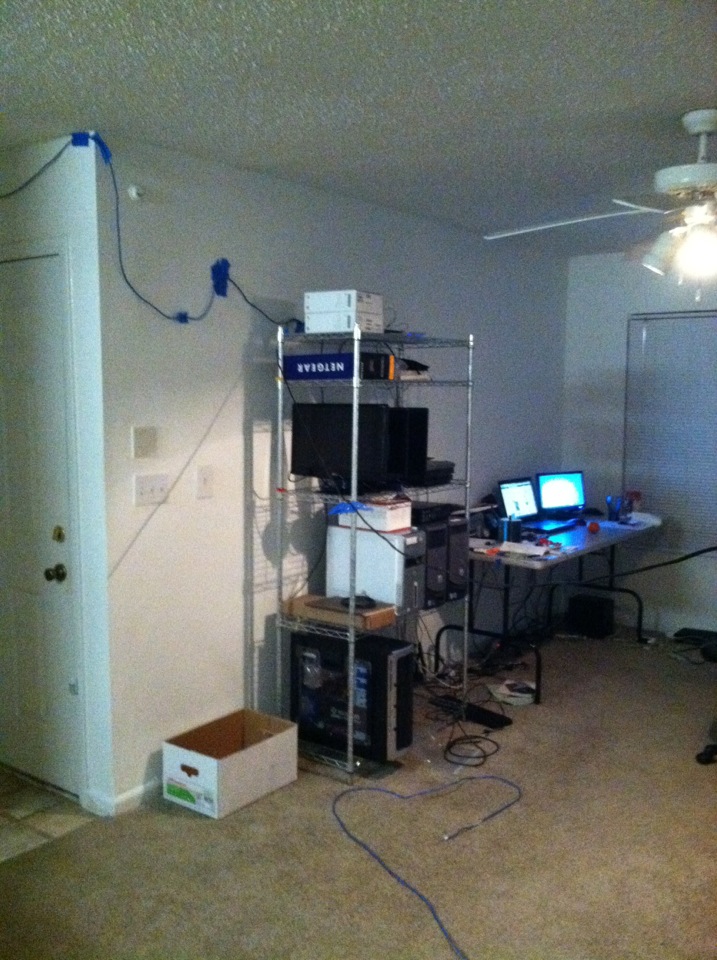
Money was tight, so this version was built from old desktops I brought home from work and whatever other hardware I could scrounge up. I found some old Cisco phones and used them as an excuse to learn VoIP. I set up a Trixbox PBX and ran phones around the apartment, including one in the kitchen and another in the bedroom.
The photos are wonderfully period-correct. The first one shows the early "run the cable wherever it reaches" stage. The second shows my attempt to make the cabling look slightly less ridiculous with actual cable mounts.

The hiatus (2012–2019)
I mostly got away from homelabbing for a while. When I bought my first house I tried to get back into it with a Dell PowerEdge R210 II. That server bounced between Hyper-V, Proxmox, and XenServer before I ended up back on Proxmox. It ran a few VMs such as Active Directory and NeoRouter. Eventually I also had a dedicated server colocated in Buffalo, New York and used ZeroTier to make it part of the lab.
The data-center lab (2019 onward)
By 2019 I was able to spend a little more on the lab, but instead of filling the house with servers I put a dedicated server in a North Carolina data center and installed Proxmox. A pfSense VM and an IPsec tunnel connected the remote lab back to the home network. Moving to UniFi made the site-to-site setup easier, and the lab eventually grew into multiple Proxmox nodes.
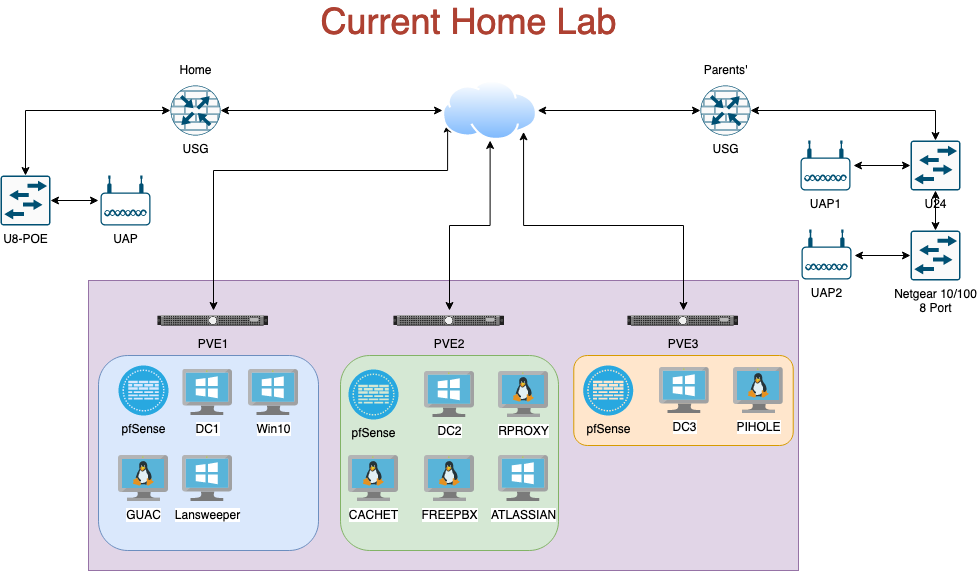
At the time that diagram was current, the three nodes were roughly:
- PVE1: pfSense plus an Active Directory/DNS server.
- PVE2: pfSense plus another Active Directory/DNS server.
- PVE3: pfSense with OpenVPN access to the network plus another Active Directory/DNS server.
More homelab stuff
- Homelab critiques — I look at public labs from an operations perspective and talk through what I would keep, change, or worry about.
- Bringing software back on-prem — things worth self-hosting for the experience, even when self-hosting is not automatically the best production answer.
- Heat management — because every server eventually turns into a space heater with an IP address.
Homelab networking
It is tempting to pick the first private subnet that comes to mind and start assigning addresses. I prefer to give myself room to grow. My network uses 10.0.0.0/8 as a supernet and splits it by location and purpose. For example, 10.200.0.0/16 is used for colo resources and 10.204.0.0/16 for resources at home. That leaves plenty of room to divide things further for VLANs without renumbering the whole network later.
IPv6 deserves the same kind of planning. A residential ISP may hand out a /64 by default, but some will delegate a /56 when requested. A /56 gives you 256 separate /64 networks, which is much nicer if you want one proper IPv6 subnet per VLAN.
What equipment should you use?
Whatever helps you learn what you actually want to learn. My labs were usually built from what I could afford, rescue, or get my hands on. That limitation was useful. You can learn a lot more from making an old desktop, a used switch, and a weird router do what you need than from buying an expensive rack because somebody on Reddit has one.
If UniFi fits what you want to learn, use UniFi. If you want Cisco, Juniper, MikroTik, VyOS, used enterprise gear, mini PCs, or a pile of junk from the closet, use that. It is your lab. The point is to understand it.
Last Modified: September 23, 2026, 2:28 pm